
We’ve all been there. You have a massive exam coming up, and you’re staring at a 40-minute YouTube lecture or a mountain of PDFs, thinking, “How am I ever going to memorize this?” Usually, you’d spend three hours just making flashcards before you even start studying. It’s exhausting.
That’s why I wanted to talk about Gizmo. It’s an AI tool that basically does the “boring” part of studying for you. It’s like having a super-smart friend who reads your notes and then quizzes you on the most important parts.
What is Gizmo AI?
In simple terms, Gizmo is an AI flashcard generator. But calling it just a “flashcard app” feels like calling a smartphone just a “calculator.”
It’s built for students who are tired of manual data entry. You give it your notes, and it uses AI to create interactive quizzes. It uses a technique called spaced repetition, which is a fancy way of saying it reminds you of facts right before you’re about to forget them. It’s designed to get information out of your notebook and into your brain as fast as possible.
How to Use Gizmo?

Using Gizmo is actually pretty fun. It doesn’t feel like a dusty old textbook; it feels more like a game. Here’s how you get started:
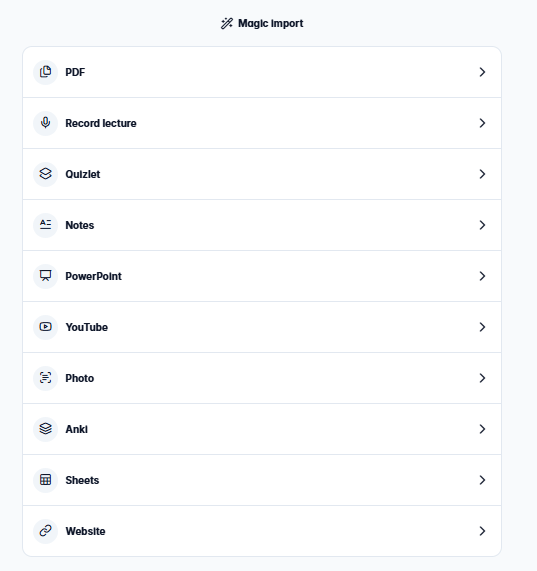
- Feed the Monster: You upload your material. This could be a PDF of your textbook, a link to a YouTube video, or even a photo of your messy handwriting.
- Let the AI Work: Gizmo scans everything and instantly generates a deck of flashcards. It picks out the key dates, names, and concepts so you don’t have to.
- The Quiz Phase: You start a “daily goal” session. It asks you questions, and you type the answer or choose from multiple choices.
- Keep Your Lives: It’s gamified! You have “lives” (hearts) just like in a video game. If you get an answer wrong, you lose a life. It sounds stressful, but it actually keeps you focused.
- Check Your Progress: The app tracks what you know well and what you’re struggling with, then builds your next session around your weak spots.
Key Features of Gizmo
I’ve tried a lot of study apps, and these are the features that actually stand out:
- YouTube Import: This is easily the best part. You can take a complex science video, paste the link, and Gizmo turns the transcript into a quiz. It’s a total game-changer for visual learners.
- The “AI Tutor”: If you get an answer wrong, you can ask the AI to explain why. It doesn’t just give you the right answer; it helps you understand the concept.
- Handwriting Magic: If you’re a pen-and-paper person, you can just snap a photo of your notes. The AI is surprisingly good at reading even slightly messy handwriting.
- Shared Decks: You can find decks made by other students. So, if you’re studying for a common exam like the SAT or a standard Biology 101 course, half the work might already be done for you.
Pricing
Gizmo’s pricing is pretty fair, especially since the free version is actually useful.
| Plan Name | Price | Key Features | Best For |
| Free | $0 | Unlimited cards, 15 daily lives | Most students. |
| Pro | ~$10/mo | Unlimited lives, priority AI, faster imports | Hardcore cramming sessions. |
Quick tip: If you run out of lives on the free plan, they refill every few minutes, so you can usually just take a short break and then get back to it.
Pros and Cons
The Good:
- Huge Time Saver: You can turn a whole semester of notes into study sets in minutes.
- Actually Fun: The “lives” and streaks make it feel less like studying and more like playing a game.
- Works Anywhere: The mobile app is great for studying on the bus or while waiting for a friend.
The Not-So-Good:
- The “Life” Limit: If you’re having a really bad day and getting everything wrong, being “locked out” of the free version for a few minutes can be annoying.
- AI isn’t Perfect: Now and then, the AI might make a card out of something trivial. You’ll want to delete a few “junk” cards here and there.
Alternatives to Gizmo
Not feeling Gizmo? You might want to check these out:
- StudyMonkey: Studymonkey can help you alot in your studies as it allows you to review your past questions and answers.
- Quizlet: The classic choice. It has more pre-made decks, but I think Gizmo’s AI for creating new cards is a bit smoother.
- Anki: If you love customization and don’t mind a very “ugly” interface, Anki is the powerhouse of spaced repetition. It’s free, but it takes a while to learn.
- Knowt: This is a great middle ground. It’s very similar to Gizmo and even lets you import your old Quizlet sets for free.
Final Words
If you’re someone who spends more time organizing your notes than actually learning them, you should definitely give Gizmo a try. It’s perfect for turning those long, boring PDFs into something you can actually engage with.
Start with the free version and see how the YouTube import works for you. It’s probably the easiest way to jumpstart your revision without the usual headache.

